Friday G Suite Updates: EOY Reminders and Smart Reply in Gmail App Friday G Suite Updates: EOY Reminders and Smart Reply in Gmail App

Happy Last Friday of the traditional school year! EOY Reminders for G Suite We have a few reminders of how to end your year in ...

Friday G Suite Update: End of Year Cleanup for Drive and Gmail Friday G Suite Update: End of Year Cleanup for Drive and Gmail

The end of the school year is here and it is a great time for students and staff to cleanup your email and drives before you leave for ...

Friday G Suite Update: End of Year Tips for Classroom! Friday G Suite Update: End of Year Tips for Classroom!

This week, we are sharing strategies for wrapping up your Google Classroom for the year. Clean Up Your Google Drive Google Classroo...

Friday G Suite Update: Use Security Check to Keep Your Account Safe! Friday G Suite Update: Use Security Check to Keep Your Account Safe!

This week our district was affected by a phishing scam that shared a malicious link posing as a Google Doc. Google has addressed the is...

Friday G Suite Update: Create a Classroom with Personal Gmail Accounts! Friday G Suite Update: Create a Classroom with Personal Gmail Accounts!

Happy Friday! This week, Classroom was updated to be available for private Gmail users. Now you can create a Classroom with a perso...

Friday Google Tidbit: Explore the New Google Earth in Chrome! Friday Google Tidbit: Explore the New Google Earth in Chrome!

Happy Friday! This week Google has launched the new Google Earth will full support for the Chrome web browser-this means you can ...

Friday Google Tidbit: Catch-Up on All G Suite Updates in March! Friday Google Tidbit: Catch-Up on All G Suite Updates in March!

Google has published their latest version of the G Suite What's New newsletter for March. You can see all the updates by product fo...

Friday Google Tidbit: New Training Resources from Google Friday Google Tidbit: New Training Resources from Google

Happy Friday! This week we are featuring the amazing training resources Google has put together for educators. The Google for Educa...

Friday Google Tidbit: New App Available to Create Screencasts on Chromebooks! Friday Google Tidbit: New App Available to Create Screencasts on Chromebooks!

Looking to do a screencast on a Chromebook? CaptureCast is a new app available in the Chrome Web Store that allows you to create sc...

Friday's Google Tidbit: Improvements to Google Sheets Friday's Google Tidbit: Improvements to Google Sheets

Google added new feature to Google Sheets, the big one is rotating text in a cell. You can angle your text or make it completely vert...

Friday Google Tidbit: Updated Google Chat Window Layout Friday Google Tidbit: Updated Google Chat Window Layout

Happy Friday! This week Google has updated the Hangouts Chat window to include notifications for unread messages. This new look will ...

Friday Google Tidbit: Google Expeditions App Now Available on iOS! Friday Google Tidbit: Google Expeditions App Now Available on iOS!

Happy Friday! Google has now released the Google Expeditions app for iOS devices! This means that you can use an iPad to contro...

Friday Google Tidbits: Insert Videos in Slides and the New Team Drive! Friday Google Tidbits: Insert Videos in Slides and the New Team Drive!

Happy Friday! This week we have two tidbits to share with you. First, Google updated Slides to now allow you to import Videos from ...

Friday Google Tidbit: New Option to Create from Template Friday Google Tidbit: New Option to Create from Template

Happy Friday! This week G Suite was updated with a new option to create a Google Doc, Slide, Sheet, or Drawing from a Template. We ...

Friday Google Tidbit: Google Forms Choose a Winner Template from Alice Keeler Friday Google Tidbit: Google Forms Choose a Winner Template from Alice Keeler

Happy Friday! This week's tidbit comes from Google Genius Alice Keeler . Alice has developed a template for Google Forms that a...

Friday Google Tidbit: Add Rooms to Google Calendar Invites Friday Google Tidbit: Add Rooms to Google Calendar Invites

Google Calendar has added a new feature to invitations that allows you to add recently used rooms to the invitation. This will save you t...

Friday Google Tidbit: New Updates to Google Classroom Friday Google Tidbit: New Updates to Google Classroom

This week Google has updated Google Classroom with three new features: assignments can now be assigned to individual students, teacher ...

Friday Google Tidbit: Check Out the Explore Tool in Google Sheets Friday Google Tidbit: Check Out the Explore Tool in Google Sheets

Recently, Google added a new feature to it's G Suite applications- the Explore tool. The Explore tool is particularly powerful for ...

Friday Google Tidbit - Web Whiteboard - Collaborate in Real Time Over Google Hangout Friday Google Tidbit - Web Whiteboard - Collaborate in Real Time Over Google Hangout

Friday Google Tidbit - Web Whiteboard Collaborate in Real Time Over Google Hangout Today's Friday Google tidbit is a collaborati...

Friday Google Tidbit: How to Setup Notification Rules on Google Sheets! Friday Google Tidbit: How to Setup Notification Rules on Google Sheets!

Happy Friday! This week we are sharing a handy feature of Google Sheets that allows you to setup custom notification alerts when a ...

Showing posts with label Friday Google Tidbit. Show all posts

Friday, June 2, 2017

Friday G Suite Updates: EOY Reminders and Smart Reply in Gmail App


Happy Last Friday of the traditional school year!

EOY Reminders for G Suite


We have a few reminders of how to end your year in Google Classroom and clean up your Google Drive/Gmail.

It is very important that if you know you will be changing schools or grade/subject areas to look at your Google Drive now and determine which files/folders you should transfer ownership. Even if you do not know who your replacement is, check with your school leadership team to see who should hold your files until a new person is in place.

Smart Reply in Gmail App


Two weeks ago, the Gmail app was updated with a new feature called Smart Reply. At the bottom of incoming messages, you should now see three blue boxes with Smart Reply options. Tap on one of the options to automatically start a new reply message with that text. You can change/modify the text in the reply message as normal. Smart Reply is responsive to your writing style and will adapt future replies to your writing style.

This is a nice time saving feature, especially when you need to reply to lots of messages.

We hope you have a wonderful summer and we will continue our Friday G Suite Updates in August!


Friday, May 19, 2017

Friday G Suite Update: End of Year Cleanup for Drive and Gmail


The end of the school year is here and it is a great time for students and staff to cleanup your email and drives before you leave for the summer.  Here are a few best practices and tools to help you.

Student/Staff Drives:

It is a good idea to backup all files on your school based drives before you leave for the summer. Refer to your EOY checkout sheets for your school process. 

Google Takeout:

To create an archive of all files on up to 16 different Google products including Drive and Gmail. This process is free and very simple, just follow the onscreen directions as shown below.

1. Create an archive by selecting the services you wish to archive:


2. Select your file download type and delivery method (by default all files will download as a zip file):


3. Click Create Archive, you will then see a status page with the progress of your archive:


4. Download your archive file, this will depend on the delivery method you chose. The default delivery method is via a link sent to your email. Note: You must have access to the hard drive or a large flash drive/portable hard drive to download your files as these are large files.

Here is the email I received when my archive was ready:


Your archive file will take some time to prepare depending on the amount of files in your Drive and Gmail; you will receive an email when the file is ready. Your archive file will be available for seven days.

Changing Roles?

Remember to check your Google Drive for folders or documents you own that you may no longer need and transfer them to someone who will be in your role. For example, if you are the owner of the 5th grade math folder for your PLC but you are changing grade levels next year, open the folder in Google Drive and click on the person with a + sign icon and click "advanced" and then make someone else the owner of the folder. You will still be able to access the folder but it will no longer be owned by your Google account.

Here is a short video on how to transfer ownership of files and folders on Google Drive.


Friday, May 12, 2017

Friday G Suite Update: End of Year Tips for Classroom!

This week, we are sharing strategies for wrapping up your Google Classroom for the year.

Clean Up Your Google Drive

Google Classroom creates a "Classroom" folder in your Google Drive. In the folder is a sub-folder for each class you have created. You can move the folders and I recommend making a new favorites folder and moving any favorite assignments or project examples to this folder. It will make it easy to add assignments or handouts next year to your new classes.

Another good idea is to create a 2016-2017 sub-folder in your "Classroom" folder and move all your current courses into the folder. This will make it clean and ready to go for next year.

Archive 2016-2017 Classes

Google has an archive tool to save your completed classes and remove them from your home screen. Note that you cannot add new assignments and students can no longer turn in assignments once a class is archived.

To archive a class, login to Google Classroom and click on the three dots next to the class you wish to archive.


To see a list of your archived classes, click on the  button and scroll to the bottom, then click on "archived classes".


Start Planning Ahead

It is not too early to go ahead and create your new classes for next year. I recommend creating new classes each semester or year, depending on how often you get new students.  Google Classroom has the ability to save assignments and announcements as drafts and reuse assignments, you can use this time to pre-populate your classes as well as add your syllabus and resource documents.

Don't forget that you can now schedule posts to appear for your students on the first day of 2017-2018!

Friday, May 5, 2017

Friday G Suite Update: Use Security Check to Keep Your Account Safe!

Image result for security

This week our district was affected by a phishing scam that shared a malicious link posing as a Google Doc. Google has addressed the issue but it brings up a timely reminder to keep our accounts secure by using strong passwords and checking device history.

Google has created a security checkup tool that allows you to view a device history of where your account has been accessed. You can report any suspicious activity and it will prompt you to change your password.

The best method of keeping your account secure is to regularly change your password and use a secure password. The best password is the most complicated password you can remember. One idea is to use a short phrase and substitute numbers and special characters for vowels, such as "C@t!nh@t".

Have a great weekend!

Friday, April 28, 2017

Friday G Suite Update: Create a Classroom with Personal Gmail Accounts!

Happy Friday!

Image result for google classroom

This week, Classroom was updated to be available for private Gmail users. Now you can create a Classroom with a personal account to use with groups or adult learners that is not tied to your edu account. I am going to suggest this to my son's soccer coach for organizing snacks and updates on games. Lots of possibilities with this announcement!

Have a great weekend!

Friday, April 21, 2017

Friday Google Tidbit: Explore the New Google Earth in Chrome!

Happy Friday!


This week Google has launched the new Google Earth will full support for the Chrome web browser-this means you can explore all the features of Google Earth on Chromebooks with no downloads required.

To get started, visit: https://earth.google.com/web/


You will see a space view of Earth with navigational tools in the lower right corner and a full toolbar menu on the left side of the screen.

Use the magnify glass on the left side to search for any location or landmark.


You can use the navigational tools in the lower right corner to zoom in and/or activate street view.

Clicking on the wheel icon on the left toolbar will open up the new Google Voyages-guided tours of different locations based on history, travel, culture, and nature.


Here is a screenshot of the deserted islands voyage...


You can advance to the next part of the voyage by clicking on the arrows in the bottom right corner.

If you are feeling lucky, you can click on the dice icon on the left toolbar to fly to a random location. This could be a great way for students to describe new locations, calculate distance, and it's just plain fun!

I hope you have a great weekend and explore the new Google Earth for Chrome!

Friday, April 7, 2017

Friday Google Tidbit: Catch-Up on All G Suite Updates in March!


Google has published their latest version of the G Suite What's New newsletter for March. You can see all the updates by product for the month of March. Please note that since we are a Google Apps for Education domain, our updates may appear on a different timeline than private Google users.


Have a wonderful Spring Break!

Friday, March 31, 2017

Friday Google Tidbit: New Training Resources from Google


Happy Friday!

This week we are featuring the amazing training resources Google has put together for educators. The Google for Education Training Center offers two levels of free professional training and an app center with just in time resources for all G Suite apps.

To access the Training Center, go to: https://edutrainingcenter.withgoogle.com/training


Not sure which path is right for you? Watch this overview video!

If you are interested in resources for using one of the G Suite Apps, check out the resource center: https://edutrainingcenter.withgoogle.com/resources/tools


Click on the tool you wish to explore and you will be taken to a page with interactive lessons to get the most out of the tool for education. I love that these lessons are tailored for educators with topics that are relevant to everyday tasks.

Here is a look at the interactive lessons available for Google Drive:


I hope you explore the resources available to you to help you "Googlify" your classroom! If you are interested, you can also complete a Level 1 and Level 2 certification exam ($15 exam fee for each exam) to become a Google Certified Educator!

Have a wonderful weekend!


Friday, March 17, 2017

Friday Google Tidbit: New App Available to Create Screencasts on Chromebooks!


Looking to do a screencast on a Chromebook?

CaptureCast is a new app available in the Chrome Web Store that allows you to create screencasts and upload to YouTube or Google Drive. CaptureCast also allows you to record your screen and the webcam at the same time, this is a feature that most Chrome screencast apps do not have.

I discovered CaptureCast after experiencing some difficulties using Screencastify and I really like how easy it is to use.


Have a wonderful weekend!

Friday, March 10, 2017

Friday's Google Tidbit: Improvements to Google Sheets


Google added new feature to Google Sheets, the big one is rotating text in a cell.
You can angle your text or make it completely vertical.


Here are other formatting options in sheets!  Check it out!  

You can make beautiful sheets with your data!
If you need assistance we are just an email away.

Friday, March 3, 2017

Friday Google Tidbit: Updated Google Chat Window Layout

Happy Friday!

This week Google has updated the Hangouts Chat window to include notifications for unread messages. This new look will be rolled out over the next two weeks and it should be helpful to prevent missed messages while you are unavailable.

Screenshot of the new chat window layout:


Have a wonderful weekend!


Friday, February 17, 2017

Friday Google Tidbit: Google Expeditions App Now Available on iOS!


Happy Friday!

Google has now released the Google Expeditions app for iOS devices!

This means that you can use an iPad to control student devices that have the free Expeditions app on them for virtual field trips using Google Cardboard viewers (the teacher device does not need a Google Cardboard viewer). In order to see student devices, the student and teacher device must be connected to the same network.

Expeditions has hundreds of virtual field trips already created and ready to view. As the leader of the expedition, you can control what students see on their screens and point out particular locations or features.

Here is a video tutorial on how to use Google Expeditions:

Have a great weekend and go explore!

Friday, February 10, 2017

Friday Google Tidbits: Insert Videos in Slides and the New Team Drive!


Happy Friday!

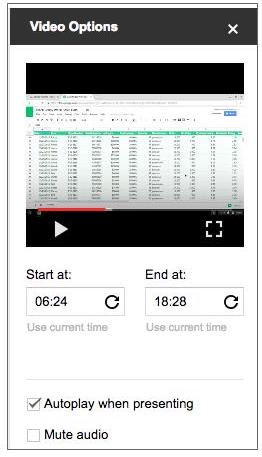
This week we have two tidbits to share with you. First, Google updated Slides to now allow you to import Videos from your Google Drive. This greatly expands the possibilities for adding videos and audio to your Google Slides presentations.


Here is a screenshot of the new options for playing videos, including an option to mute audio.

Google also recently introduced a new feature in Google Drive, called Team Drive. Team Drive allows you to share files with a team of users. One benefit of Team Drive is that if one team member leaves, the remaining members still have access to the files on the Team Drive. The main drawback to using Team Drive is that you cannot have files in both your personal Drive and the Team Drive. Team Drive is a brand new feature to stay tuned for more updates about its possible uses.

Friday, February 3, 2017

Friday Google Tidbit: New Option to Create from Template


Happy Friday!

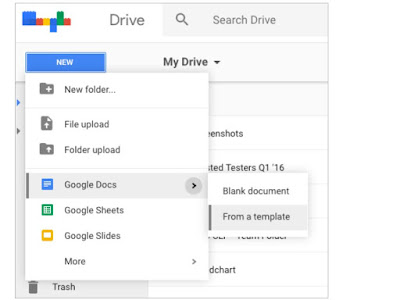
This week G Suite was updated with a new option to create a Google Doc, Slide, Sheet, or Drawing from a Template. We do have a template gallery just for JCS, you can upload your own templates to the gallery and students can use them to create from the templates. This is handy if you have a specific format you want your students to use for a project.

Here is a screenshot of the new feature:

Have a great weekend!

Friday, January 27, 2017

Friday Google Tidbit: Google Forms Choose a Winner Template from Alice Keeler


Happy Friday!

This week's tidbit comes from Google Genius Alice Keeler. Alice has developed a template for Google Forms that allows you to choose a random winner from the form responses. This is very handy if you use a Google Form for giveaways or to choose students to share explanations. Alice has created a template form to use with your students as well as the script code if you have already created your Google Form and would like to choose a random winner.

Please click here to view Alice's blog post with the template and instructions.

Have a Great Weekend!

Friday, January 20, 2017

Friday Google Tidbit: Add Rooms to Google Calendar Invites

Google Calendar has added a new feature to invitations that allows you to add recently used rooms to the invitation. This will save you time if you frequently meet in the same room.

Here is a screenshot of the new feature:

This feature will be released to users over the next two weeks.

Have a great weekend!


Friday, January 13, 2017

Friday Google Tidbit: New Updates to Google Classroom


This week Google has updated Google Classroom with three new features: assignments can now be assigned to individual students, teacher notifications for students who submit late assignments, and teacher notifications for students who resubmit assignments. These are exciting updates that make it easier to personalize your instruction in Google Classroom.

How to Assign to Individual Students:


How to Setup Classroom Notifications


Click on the link above to setup your classroom notifications for when you get an email alert for certain actions including when a student submits late assignments or resubmits assignments.

For more detailed information about these updates, check out the Google Education blog.

Have a great weekend!

Friday, January 6, 2017

Friday Google Tidbit: Check Out the Explore Tool in Google Sheets


Recently, Google added a new feature to it's G Suite applications- the Explore tool. The Explore tool is particularly powerful for Google Sheets as it allows you to ask questions and it will analyze the data in your spreadsheet to answer your question. The Explore tool can also format your spreadsheet and create charts based on the data.

Check out this short video tutorial:


I hope you explore this new tool in Google Sheets!

Have a great weekend!

Friday, December 16, 2016

Friday Google Tidbit - Web Whiteboard - Collaborate in Real Time Over Google Hangout

Friday Google Tidbit - Web Whiteboard

Collaborate in Real Time Over Google Hangout


Today's Friday Google tidbit is a collaborative tool called Web Whiteboard


While there are several online whiteboard tools available for free, Web Whiteboard has a feature that none of the others have - integration with Google Hangout. 


You can use Web Whiteboard over Google Hangout to allow several people to write in a collaborative space at the same time. There are drawing tools available to allow more than simple text. This allows for the creation of diagrams, mind maps and other brainstorming ideas. All you have to do in order to use this in a Hangout is click the green "Start a Hangout" button from the Web Whiteboard homepage. The instructions will guide you through the rest!

Friday, December 9, 2016

Friday Google Tidbit: How to Setup Notification Rules on Google Sheets!


Happy Friday!

This week we are sharing a handy feature of Google Sheets that allows you to setup custom notification alerts when a spreadsheet has been edited. This is especially useful with Google Forms as you can create an email alert when a user submits a form.

To get started, open the spreadsheet you wish to create a notification rule from. Please note that each user can setup their own notification rules so this works even on shared spreadsheets.

Once your spreadsheet is open, click on the "Tools" menu and click "Notification rules":


You will now see the notification options:


You can receive an email alert when a change is made or a user submits a form. Alerts can be sent once a day or right away. If you select right away, you will receive an email every time either a change is made or a form is submitted...that could be a lot depending on how active your document is. Click on "Save" to apply your notification rules.

Some ideas for application: Parent meeting requests via Google Forms, volunteer applications, physicals for sports eligibility, absence documentation, and digital data spreadsheets.

Have a great weekend!