Friday's Google Tidbit: Improvements to Google Sheets Friday's Google Tidbit: Improvements to Google Sheets

Google added new feature to Google Sheets, the big one is rotating text in a cell. You can angle your text or make it completely vert...

Friday Google Tidbit: New Option to Create from Template Friday Google Tidbit: New Option to Create from Template

Happy Friday! This week G Suite was updated with a new option to create a Google Doc, Slide, Sheet, or Drawing from a Template. We ...

Wednesday Web Tool: New Add-on from Flippity for Google Sheets! Wednesday Web Tool: New Add-on from Flippity for Google Sheets!

This week Flippity launched a new add-on for Google Sheets that allows students to easily create templates for flashcards, quiz show, h...

Friday Google Tidbit: Check Out the Explore Tool in Google Sheets Friday Google Tidbit: Check Out the Explore Tool in Google Sheets

Recently, Google added a new feature to it's G Suite applications- the Explore tool. The Explore tool is particularly powerful for ...

Friday Google Tidbit: How to Setup Notification Rules on Google Sheets! Friday Google Tidbit: How to Setup Notification Rules on Google Sheets!

Happy Friday! This week we are sharing a handy feature of Google Sheets that allows you to setup custom notification alerts when a ...

Friday Google Tidbit: New Templates Available for Google Docs, Sheets, and Slides Friday Google Tidbit: New Templates Available for Google Docs, Sheets, and Slides

Happy Friday! This week Google has introduced new templates for Google Docs, Sheets, and Slides. These templates make it easy to ma...

Friday Google Tidbit: New Versions of Google Docs, Sheets, and Slides Friday Google Tidbit: New Versions of Google Docs, Sheets, and Slides

New Versions of Google Docs, Sheets, and Slides Update: Back in May, Google released new mobile apps for Google Docs, Sheets, and Sl...

Friday Google Tidbit: Important Change to Google Drive App- Now View Only for Google Docs and Sheets! Friday Google Tidbit: Important Change to Google Drive App- Now View Only for Google Docs and Sheets!

A few weeks ago Google launched new Apps for Google Docs and Google Sheets. They have recently changed Google Drive App to a view onl...

Showing posts with label Google Sheets. Show all posts

Friday, March 10, 2017

Friday's Google Tidbit: Improvements to Google Sheets


Google added new feature to Google Sheets, the big one is rotating text in a cell.
You can angle your text or make it completely vertical.


Here are other formatting options in sheets!  Check it out!  

You can make beautiful sheets with your data!
If you need assistance we are just an email away.

Friday, February 3, 2017

Friday Google Tidbit: New Option to Create from Template


Happy Friday!

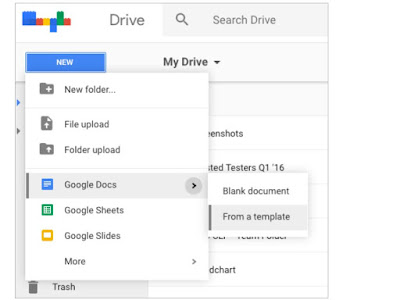
This week G Suite was updated with a new option to create a Google Doc, Slide, Sheet, or Drawing from a Template. We do have a template gallery just for JCS, you can upload your own templates to the gallery and students can use them to create from the templates. This is handy if you have a specific format you want your students to use for a project.

Here is a screenshot of the new feature:

Have a great weekend!

Wednesday, January 11, 2017

Wednesday Web Tool: New Add-on from Flippity for Google Sheets!


This week Flippity launched a new add-on for Google Sheets that allows students to easily create templates for flashcards, quiz show, hangman, spelling words, MadLibs creator, or a badge tracker. These templates really increase the range of activities you can use Flippity for in your classroom and are great for younger students who may struggle with spreadsheet setup.

Add-ons are tied to your Google Account so every teacher/student needs to install the add-on one time to use it on all devices logged in to that Google Account. 

To get started, open a new Google Sheet and click on the "Add-ons" menu:


Click on "Get add-ons":


Search for "Flippity" and click on the blue "Free" button to install the add-on:


Allow the add-on to connect to your Google account:


Go back to the Add-ons menu, click on Flippity-->Pick a Template:


Now pick which template you would like to use. Flippity offers a demo link for each template to show an example and how to use the template.


After you pick your template, your Google sheet is reformatted and you are ready to move to enter your data following the template.

I hope you use the new Flippity add-on with your students! I would love to see what your students create, please feel to share with me via email or social media.

Friday, January 6, 2017

Friday Google Tidbit: Check Out the Explore Tool in Google Sheets


Recently, Google added a new feature to it's G Suite applications- the Explore tool. The Explore tool is particularly powerful for Google Sheets as it allows you to ask questions and it will analyze the data in your spreadsheet to answer your question. The Explore tool can also format your spreadsheet and create charts based on the data.

Check out this short video tutorial:


I hope you explore this new tool in Google Sheets!

Have a great weekend!

Friday, December 9, 2016

Friday Google Tidbit: How to Setup Notification Rules on Google Sheets!


Happy Friday!

This week we are sharing a handy feature of Google Sheets that allows you to setup custom notification alerts when a spreadsheet has been edited. This is especially useful with Google Forms as you can create an email alert when a user submits a form.

To get started, open the spreadsheet you wish to create a notification rule from. Please note that each user can setup their own notification rules so this works even on shared spreadsheets.

Once your spreadsheet is open, click on the "Tools" menu and click "Notification rules":


You will now see the notification options:


You can receive an email alert when a change is made or a user submits a form. Alerts can be sent once a day or right away. If you select right away, you will receive an email every time either a change is made or a form is submitted...that could be a lot depending on how active your document is. Click on "Save" to apply your notification rules.

Some ideas for application: Parent meeting requests via Google Forms, volunteer applications, physicals for sports eligibility, absence documentation, and digital data spreadsheets.

Have a great weekend!

Friday, March 4, 2016

Friday Google Tidbit: New Templates Available for Google Docs, Sheets, and Slides

Happy Friday!


This week Google has introduced new templates for Google Docs, Sheets, and Slides. These templates make it easy to make reports, resumes, and newsletters in Google and look very similar to the templates offered in Microsoft Office products. 

To access the templates, you will need to open the home screen of Google Docs, Sheets, or Slides (you can also open the app on a mobile device to see the templates).

From your email, click on the Google Apps Launcher, then click on one of the Google Apps:


This will take you to the app "home screen":


Look for the "More" button on the right side to view all the templates available:


If you scroll down to see additional template categories, you will see Education templates:


Click on any template to create a copy of that document that you can start editing!

Some of my favorites are the newsletter and report templates for Google Docs. I hope these templates make it easier for you and your students to create beautiful documents!

Have a Great Weekend!

Friday, December 12, 2014

Friday Google Tidbit: New Versions of Google Docs, Sheets, and Slides

New Versions of Google Docs, Sheets, and Slides


Update: Back in May, Google released new mobile apps for Google Docs, Sheets, and Slides. The new apps have allowed for more editing options for docs on the go as well as a new offline feature that allows you to edit documents offline and automatically loads them the next time you connect to the internet.  At the time, the Android version was better than the IOS version. This week, Google updated the Docs, Sheets, and Slides iOS app. You can now view and edit text in tables in Docs and insert, move, resize and rotate text boxes, shapes and lines in the updated Slides app.


Click below to access/download these new apps:

Friday Google Bonus
Let Google Drive take some of the holiday stress. Click here to see how to: Organize your holiday essentials, Quickly share family files, Go attachment free in holiday emails, View Google files offline, and Share lists across devices.
This guide might also be helpful!


Questions or comments?
Email me at brandywhitley@johnston.k12.nc.us


Friday, May 23, 2014

Friday Google Tidbit: Important Change to Google Drive App- Now View Only for Google Docs and Sheets!


A few weeks ago Google launched new Apps for Google Docs and Google Sheets. They have recently changed Google Drive App to a view only mode for Docs and Sheets.  If you wish to edit your Docs or Sheets from a mobile device, you must download the new apps available for each type of document.

When you try to edit a document using Google Drive App, you will see a message like this:


You can click the message link within Google Drive App to download the free Apps or you can use one of these links:


Want more information about the Google Docs or Google Sheets Apps? Click HERE

Please share this information with your staff so they will know to download the new apps on their mobile devices.