Friday Google Tidbit: New Inbox Design Available Friday Google Tidbit: New Inbox Design Available

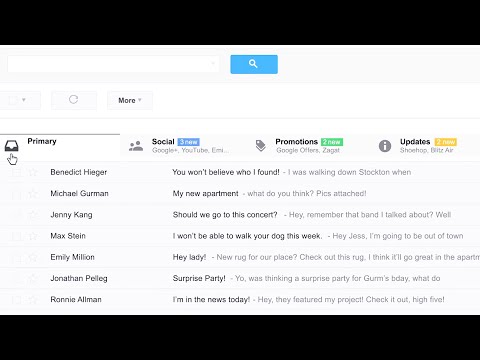
Google has released a new inbox design option for email that is a significant change. The new inbox design features tabs that you can custo...

Friday Google Tidbit: New Search Feature in Google Mail Friday Google Tidbit: New Search Feature in Google Mail

Right now you can use the search bar within Google Mail to easily search for an email. This is what mine looked like the last time I search...

Friday Google Tidbit: New Feature-Schedule Events within Google Mail Friday Google Tidbit: New Feature-Schedule Events within Google Mail

This week Google is making scheduling events on your calendar easier by rolling out a new feature to all mail users. The new feature allows ...

Showing posts with label google mail. Show all posts

Friday, June 14, 2013

Friday Google Tidbit: New Inbox Design Available

Google has released a new inbox design option for email that is a significant change. The new inbox design features tabs that you can customize to easily sort your email. Here is a short video explaining the new inbox design:


Right now, your inbox may look like this:


To switch to the new inbox design, click on the settings cog and then "configure inbox"


You will see a box with the different tabs available and a short description of each tab. A nice feature is that Google gives personalized examples of what emails will go under each tab.


For my inbox, you can see the examples that will go into my "social" tab: blogs and social network updates. You should check the tabs you wish to enable and click on the save button.


Voila! 
I now have a tabbed inbox. You can click and drag emails to different tabs and Google will remember where you put them and deliver future messages to that tab.

WAIT!!!

What if I do not like tabs and want my old inbox back???

It is very simple to change the inbox design back. Just click on the settings cog, then configure inbox, and uncheck all tabs except for primary and click save. You inbox will revert back to the standard view.


Friday, May 31, 2013

Friday Google Tidbit: New Search Feature in Google Mail

Right now you can use the search bar within Google Mail to easily search for an email. This is what mine looked like the last time I searched my inbox:


Google is introducing a new feature that will allow you to search across your Google Drive as well as email.


This is what the search results will look like once Google has updated our accounts. You will be able to see relevant Google Docs at the bottom of the search window.

This new feature will be released within the next week and should make it easier to quickly locate a file or email.

Friday, May 10, 2013

Friday Google Tidbit: New Feature-Schedule Events within Google Mail

This week Google is making scheduling events on your calendar easier by rolling out a new feature to all mail users. The new feature allows you to schedule new events to your calendar from your email. Now Google scans your emails for dates, times, or locations and underlines them with a dotted line. Here is an example:


In this example, you can see the faint underlining on the word Thursday as well as the times mentioned. If you click on one of the underlined words, you will see this:


You can add a time or any other details and then click on add to calendar to save the new event. The new event can be edited by going to your Google calendar.

Google is still rolling out this new feature so if you do not see it now; your account should be updated within the next few days to have access to this handy feature.