Clever in NCEdCloud Clever in NCEdCloud

Beginning today staff and students should see Clever in NCEdCloud.  Clever is currently used for NWEA, Lexia and Freckle.  Please share w...

Schoolnet Upgrade Coming on Friday! Schoolnet Upgrade Coming on Friday!

This Friday, Schoolnet will be updated to version 18.1 Schoolnet will be unavailable from 8am Friday, January 27th until 8am Monda...

Important Update on Access to Student PowerSchool/Schoolnet Login Information for Teachers Important Update on Access to Student PowerSchool/Schoolnet Login Information for Teachers

We have reports of teachers no longer having the My Students Tab in the state NCEdCloud Portal.   We have not been able to determine t...

Employee Password Expiration Policy Now in Effect for NCEdCloud Employee Password Expiration Policy Now in Effect for NCEdCloud

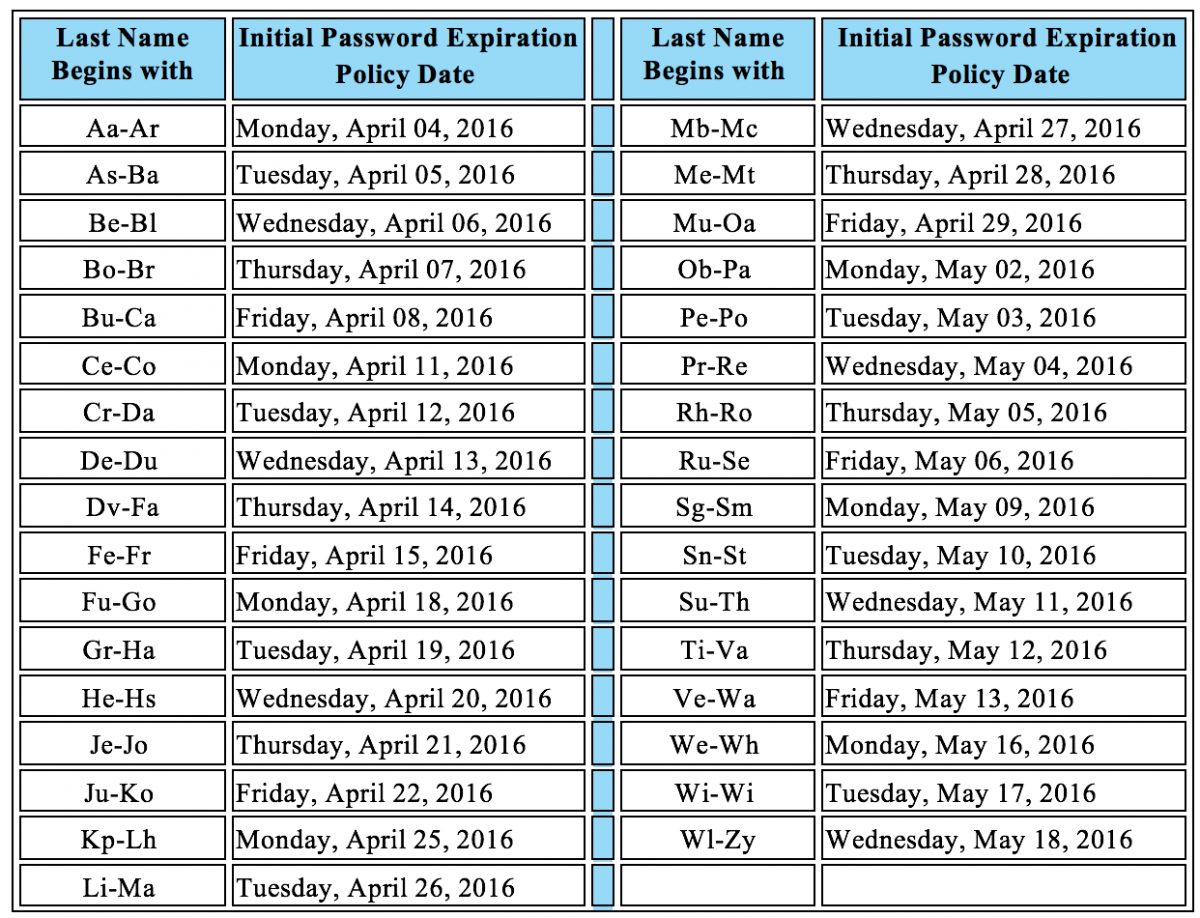
Starting this week, employee passwords will begin to expire every 90 days for the NCEdCloud IAM system. To begin this policy, employee p...

Update: DPI Changes to NCWiseOwl & NCLive Update: DPI Changes to NCWiseOwl & NCLive

Please share the following information with school staff that use  NCWiseOwl  resources.  *************** Just a reminder that th...

Student Accounts for PowerSchool/Schoolnet Important Updates-Please Share! Student Accounts for PowerSchool/Schoolnet Important Updates-Please Share!

Student accounts for PowerSchool/Schoolnet are now managed by Rapid Identity which means that logins from last year and last year'...

Help Us to Help You! Help Us to Help You!

Technology Services has asked us to post a few reminders about current issues. Technology Services is happy to help you with NCEdCl...

PowerTeacher Login Video PowerTeacher Login Video

PowerTeacher Gradebook Tutorial CloudIAM has been implemented statewide this summer.  Union County put together this short video clip on h...

Latest News from ISD! Latest News from ISD!

Over the summer we have been working diligently on several BIG projects and we wanted to give you an update on where we stand. Project ...

Reminder: Please Encourage Your Staff to Claim Their CloudIAM Accounts! Reminder: Please Encourage Your Staff to Claim Their CloudIAM Accounts!

Please be reminded that all staff who access PowerSchool or PowerTeacher must claim their account before they leave for the summer. This in...

How to Claim Your NCEdCloud IAM Account and Important Staff Information! How to Claim Your NCEdCloud IAM Account and Important Staff Information!

On July 6th, 2015 you will need to use a new NCEdCloud IAM account to access PowerSchool and the Home Base suite. The NCEdCloud IAM acc...

Showing posts with label NCEdCloud. Show all posts

Wednesday, October 2, 2019

Clever in NCEdCloud

Beginning today staff and students should see Clever in NCEdCloud.  Clever is currently used for NWEA, Lexia and Freckle.  Please share with teachers that they need to transition students away from the kiosk apps and begin using this method to get to these applications.  

Note: We might use clever for additional apps in the future.


Monday, January 23, 2017

Schoolnet Upgrade Coming on Friday!


This Friday, Schoolnet will be updated to version 18.1

Schoolnet will be unavailable from 8am Friday, January 27th until 8am Monday, January 30th.

Version 18.1 has many new features, including:
  • Text to Speech Support for Online Testing (Read Aloud)
  • Gap Match (New Item Type)
  • Support for Multiple Standards Alignments on a Test Item
  • The New Analysis Spreadsheet Viewer
  • Standards Performance (New Classrooms Report)
  • KPI Dashboard (New Display)
Stay tuned for more details and a tutorial video on how to use the Text to Speech Support feature!

Friday, November 4, 2016

Important Update on Access to Student PowerSchool/Schoolnet Login Information for Teachers


We have reports of teachers no longer having the My Students Tab in the state NCEdCloud Portal.  

We have not been able to determine the issue with NCEdCloud staff but we do know it relates to flagging staff with specific job codes.  We have verified with a few of the teachers who no longer have the My Students Tab that they do have the correct job code.  


The NCEdCloud support staff have advised the teachers missing the My Student Tab to request the My Students for Non-teachers role to reinstate access to change student passwords. 


The “My Students for Non-teachers” exception role in the IAM Service can optionally be requested by teachers and staff that don't have one of the specific jobs the system flags (or system issues not recognizing correct codes) but do have students assigned to them. When granted, this role allows teachers and staff who are teaching classes but do not fall within the previous job codes, to see their assigned students via the "My Students for Non-teachers" tab in the IAM service.  This role must be requested each school year, as it will expire on June 30th of the school year in which it is granted.

To request this role, the teacher would do the following after logging into my.ncedcloud.org:

Workflow tab -> Requests -> Check "My Students for non-Teachers" box -> click "Submit Request" button

The request would then go to a JCS employee with the LEA Administrator role for Approval. NOTE:  Requests for LEA Student Help Desk will not be approved so be sure they are requesting the "My Students for non-Teachers"

For more details: https://ncedcloud.mcnc.org/content/who-can-see-my-students-tab-iam-service-profiles-view

Monday, April 4, 2016

Employee Password Expiration Policy Now in Effect for NCEdCloud


Starting this week, employee passwords will begin to expire every 90 days for the NCEdCloud IAM system. To begin this policy, employee passwords will start to expire according to the schedule below based on the user's last name.


Please note that this policy does not apply to students.


Please share this information with your staff so they will be aware when they see the password expiration notification when they login to the NCEdCloud.

For more information, please review this blog post from the NCEdCloud IAM service.

Tuesday, March 8, 2016

Update: DPI Changes to NCWiseOwl & NCLive


Please share the following information with school staff that use NCWiseOwl resources. 

***************
Just a reminder that the following EBSCO resources are being discontinued and have been replaced by Explora:
  • ​Student Research Center
  • Kids Search
  • Searchasaurus
Explora is now available from the left side navigation in each of the zones.


As you may know, PBS videos have been accessible through an NCWiseOwl partnership with NC LIVE. This collection includes videos from PBS including Ken Burns’ documentaries, Masterpiece Theater, Scientific American, American Experience, and more. This content has been accessible for districts and charter schools from the www.ncwiseowl.org site by clicking on the link for "PBS Videos". We are pleased to announce that there is now an additional way to access this content.


On March 8, 2016 students and teachers will be able to access the NC LIVE streaming video collection using an application within the NCEdCloud IAM Service. LEA and charter school users will also now be able to access this content using the icon below that will be made available on their my.ncedcloud.org applications page:

We are excited to provide you with additional ways to access this content. Provided that your district has registered external IPs with NCWiseOwl, you will still be able to automatically authenticate and access the streaming video content through the NCWiseOwl site. Please choose the best access option that works to meet the needs of your students.

See below for answers to commonly asked questions about the NC LIVE streaming video service.

Q: Are there technical requirements for my network to allow access to the Media Collection?
A: Yes, your network firewall will need to allow traffic through the following ports:

media.nclive.org : port 80
fms.nclive.org : port 1935

In addition, all computers on the network need to accept cookies from the nclive.org domain.

Contact your local network administrator for more information.

Q: What hardware, software, and other technology do I need to watch the NC LIVE Video Collection?
A: Videos can be viewed on any device with an Internet connection and Adobe Flash Player (version 9 or higher) software. Your device must have an Internet connection speed of at least 175 Kbps.

NC LIVE Media Collection videos are available in three streaming formats: a lower bandwidth option (175 Kbps), a standard bandwidth option (400 Kbps), and a high bandwidth option (1MB). Videos cannot be downloaded or saved to a device.

Q: Do libraries and schools have public performance rights for Films on Demand and NC LIVE Videos Collection?A: Yes! Public performance rights are provided to NC LIVE member libraries, provided the library or any other exhibitor does not charge an admission fee or derive monetary gain.


Tuesday, August 25, 2015

Student Accounts for PowerSchool/Schoolnet Important Updates-Please Share!


Student accounts for PowerSchool/Schoolnet are now managed by Rapid Identity which means that logins from last year and last year's method of accessing student logins may not work. According to DPI, students in grades 6-12 MUST claim their NCEdCloud account in order to access PowerSchool/Schoolnet.

Teachers of K-5 students have access to a list of their students new account usernames and passwords under their NCEdCloud account.

We have prepared documentation for how 6-12 students can claim their accounts as well as how K-5 teachers can access their students account information.


Every school has a NCEdCloud help desk support person to facilitate account resets. Thank you for your support in sharing this information with your staff to ensure access to all instructional tools available.

Friday, August 21, 2015

Help Us to Help You!

Technology Services has asked us to post a few reminders about current issues.


Technology Services is happy to help you with NCEdCloud issues, here are a few tips to help you with the most common issues:

  1. Within the Powerschool Portal, it is best to search by User ID. If they do not know their User ID, then search by last name.
  1. If you need to contact Stephanie Canning or Michelle Turnage for additional support, please include the staff member's name and User ID in your help request.

Please encourage your staff to update their email signatures and websites with their new phone extensions.


Tuesday, August 4, 2015

PowerTeacher Login Video

PowerTeacher Gradebook Tutorial
CloudIAM has been implemented statewide this summer.  Union County put together this short video clip on how to access PowerTeacher Gradebook and the Student PowerSchool login using NCEdCloud.  We feel your teachers and students might find it helpful so please share with your staff.

Click the link above

Thursday, July 16, 2015

Latest News from ISD!


Over the summer we have been working diligently on several BIG projects and we wanted to give you an update on where we stand.

Project 1: VOIP - Voice over IP - this project is complete and ready to go your school's office staff have been training for your return, if you have questions about your new phone refer to your school secretary first.  All phones should be connected to a desktop which in turn connects to the internet. All extensions are unique, which requires updated directories (we are continuing to work on extensions)  Here is a picture of what the phone connection should look like - check this first if you are having trouble with your phone.


Project 2: Cloud IAM - REMEMBER there is a state hosted Cloud IAM and a local one.  We have completed the transition to the state hosted site and the JCOC page now has a link to "Homebase NCEdCloud" which will take you to state hosted log in - this is your powerschool log in and the account you claimed prior to the summer.  If you have trouble with this account you should ask your tech person who should be able to "Reset" your password - or you can use your security questions to reset your own password.
The Local CloudIAM is going to be called "JCS Portal" and will be linked up as soon as it goes live - this will be the same location for both students and staff.  The apps will be added in phases but the first app will be Google. More information to come as we move forward.

Project 3: iBoss filtering which has been turned on, this will be our new filter.  If you have websites showing as blocked that you would like have unblocked you will see this option - simply "Request Exception" and enter your email and a small description of how you use the site for it to be reviewed.


You will also see one time authentication page that looks like this.  You will simply click "Accept" and continue.  This will show for all users one time.
More information to come as we continue to roll out the latest features of this new system.

We are excited to bring you these new and exciting tools!  
ISD Team


Thursday, May 28, 2015

Reminder: Please Encourage Your Staff to Claim Their CloudIAM Accounts!

Please be reminded that all staff who access PowerSchool or PowerTeacher must claim their account before they leave for the summer. This includes administration staff.

The most common issue we have had is that staff are trying to login or reset their account once they click on the CLOUD IAM link. They must click on the "Claim My Account" button as pictured below.


On July 6th, 2015 you will need to use a new NCEdCloud IAM account to access PowerSchool and the Home Base suite.

The NCEdCloud IAM account is a single-sign on service that is mandated by DPI. The process to claim your account is simple and takes just a few minutes. Your new account is based on your current PowerSchool UserID number. All staff must claim their accounts prior to July 6th, 2015 or they will be unable to access PowerSchool or the Home Base suite until they claim their account.

One benefit to this process is that teachers will have access to their student's usernames and passwords to aid in access to PowerSchool.

To help you prepare your staff, we have created a step-by-step training video as well as a flyer for you to share.

Please help us get the word out about this important process to minimize disruptions next year.

Here is the three-minute instructional video (click here for the direct link):

Information Flyer (click here for the direct link):


Thursday, March 26, 2015

How to Claim Your NCEdCloud IAM Account and Important Staff Information!

On July 6th, 2015 you will need to use a new NCEdCloud IAM account to access PowerSchool and the Home Base suite.

The NCEdCloud IAM account is a single-sign on service that is mandated by DPI. The process to claim your account is simple and takes just a few minutes. Your new account is based on your current PowerSchool UserID number. All staff must claim their accounts prior to July 6th, 2015 or they will be unable to access PowerSchool or the Home Base suite until they claim their account.

One benefit to this process is that teachers will have access to their student's usernames and passwords to aid in access to PowerSchool.

To help you prepare your staff, we have created a step-by-step training video as well as a flyer for you to share.

Please help us get the word out about this important process to minimize disruptions next year.

Here is the three-minute instructional video (click here for the direct link):

Information Flyer (click here for the direct link):