Student Google Account Changes Student Google Account Changes

Due to continued concern about safety we are adjusting the following settings in our Google Domain. Elementary Email and Drive changes ...

Friday G Suite Updates: EOY Reminders and Smart Reply in Gmail App Friday G Suite Updates: EOY Reminders and Smart Reply in Gmail App

Happy Last Friday of the traditional school year! EOY Reminders for G Suite We have a few reminders of how to end your year in ...

Friday Google Tidbit: Major Updates to Gmail and Google Calendar Apps for iOS Friday Google Tidbit: Major Updates to Gmail and Google Calendar Apps for iOS

Happy Friday! Last week Google released a major update to their Gmail and Calendar apps for iOS devices. Both apps have a new look an...

Friday Google Tidbit: Tips for Working Offline Friday Google Tidbit: Tips for Working Offline

Imagine: It is 7:12am, you have ten minutes until students enter your classroom and when you try to access Google Drive you see this me...

Friday Google Tidbit: How to Set Gmail as Your Default Email Handler! Friday Google Tidbit: How to Set Gmail as Your Default Email Handler!

Happy Friday! This week we are sharing a handy tip to make Gmail your default email handler. What this means is that when you click o...

Friday Google Tidbit: Digitally Print Google Emails to Drive Friday Google Tidbit: Digitally Print Google Emails to Drive

Digitally Print Google Emails to Drive Clean up your inbox by saving those “MUST KEEP” emails in your Google Drive. To get started,...

Friday Google Tidbit: Canne Responses in G-Mail Friday Google Tidbit: Canne Responses in G-Mail

Canned Response in G-mail This tip is for perfect for those who get the same question over and over again by email. Instead of retyping ...

End of Year Cleanup for Drive and Gmail-Google Takeout End of Year Cleanup for Drive and Gmail-Google Takeout

The last week of school is here and it is a great time for students and staff to cleanup your email and drives before you leave for...

Friday Google Tidbits: New Look for Chat and Great Chrome Extension for Reading and Writing Support is now Free! Friday Google Tidbits: New Look for Chat and Great Chrome Extension for Reading and Writing Support is now Free!

Happy Friday! This week, we have two new Google tidbits to share. First, Google Chat in Gmail has been upgraded to a new look wit...

Friday Google Tidbits: Quick Tutorial on Inserting Invitations in Gmail and New Image Tools for Google Docs Friday Google Tidbits: Quick Tutorial on Inserting Invitations in Gmail and New Image Tools for Google Docs

Happy Friday! Today, we have two Google tidbits to share. First, I have created a quick tutorial screencast on how to insert cale...

Friday Google Tidbit: New Tool to Insert Images in Gmail Friday Google Tidbit: New Tool to Insert Images in Gmail

Happy Friday! This week, Google has released a new tool for inserting images into an email. Previously, you clicked on the paper-clip i...

Friday Google Tidbit: How to logout of your Google account remotely from anywhere! Friday Google Tidbit: How to logout of your Google account remotely from anywhere!

Have you ever logged into Google on a computer or  device and then left, forgetting to log out first  but remembered when you went to l...

Friday Google Tidbit: New Gmail Option-Download to Google Drive Coming Soon! Friday Google Tidbit: New Gmail Option-Download to Google Drive Coming Soon!

Earlier this week, Google announced a new update to Gmail and how attached files in an email can be downloaded. With the new update, ...

Showing posts with label Gmail. Show all posts

Tuesday, March 6, 2018

Student Google Account Changes


Due to continued concern about safety we are adjusting the following settings in our Google Domain.

Elementary Email and Drive changes beginning March 12:

  • Student email will be limited to @jcsnc.org and @johnston.k12.nc.us they will not be allowed to email outside domains nor will they be able receive emails from outside email addresses
  • Student drive files will be also limited to @jcsnc.org and @johnston.k12.nc.us, if a student wants to show something to their parents they can log in and share that way
Middle School and High School changes are possible, please complete this survey by March 12, Elementary is welcome to participate as well:


Please continue to talk about Digital Citizenship with your teachers and students on a regular basis! Here are resources you can use:
Thanks for all you do,
Amy and the Tech Team


Friday, June 2, 2017

Friday G Suite Updates: EOY Reminders and Smart Reply in Gmail App


Happy Last Friday of the traditional school year!

EOY Reminders for G Suite


We have a few reminders of how to end your year in Google Classroom and clean up your Google Drive/Gmail.

It is very important that if you know you will be changing schools or grade/subject areas to look at your Google Drive now and determine which files/folders you should transfer ownership. Even if you do not know who your replacement is, check with your school leadership team to see who should hold your files until a new person is in place.

Smart Reply in Gmail App


Two weeks ago, the Gmail app was updated with a new feature called Smart Reply. At the bottom of incoming messages, you should now see three blue boxes with Smart Reply options. Tap on one of the options to automatically start a new reply message with that text. You can change/modify the text in the reply message as normal. Smart Reply is responsive to your writing style and will adapt future replies to your writing style.

This is a nice time saving feature, especially when you need to reply to lots of messages.

We hope you have a wonderful summer and we will continue our Friday G Suite Updates in August!


Friday, November 18, 2016

Friday Google Tidbit: Major Updates to Gmail and Google Calendar Apps for iOS

Happy Friday!

Last week Google released a major update to their Gmail and Calendar apps for iOS devices. Both apps have a new look and features to help you stay organized on the go.

With the latest version of the Gmail app you can now:

  • Undo Send, just like on the desktop version, this is great to prevent typos or missing information.
  • Search faster with instant results and spelling suggestions (great for flubby text fingers like mine).
  • Swipe to archive or delete emails.

In the updated Google Calendar app, you will notice several new features:

  • You can rotate your device to see your calendar in month or week view.
  • Spotlight Search support, so you can search for events, reminders, and goals in the Apple Spotlight Search.
  • Alternate calendar support for Lunar, Islamic, or Hindu calendars.

Friday, April 22, 2016

Friday Google Tidbit: Tips for Working Offline

Imagine:

It is 7:12am, you have ten minutes until students enter your classroom and when you try to access Google Drive you see this message:


At this point, you might feel like this:


Thankfully, Google has some features and tools to keep us working even when the internet is down. The key is that we need to prepare for this situation in advance (while the internet is working).

Watch this episode of the Google Apps Show and learn all about accessing Gmail and Google Drive without an internet connection (click here for the direct link to the video):


With offline access, you can be prepared and productive anywhere from the ball field to the beach!

Have a great weekend!

Friday, November 6, 2015

Friday Google Tidbit: How to Set Gmail as Your Default Email Handler!

Happy Friday!

This week we are sharing a handy tip to make Gmail your default email handler. What this means is that when you click on a hyperlinked email address in a Google Doc or on a Website, it will open your Gmail account instead of Microsoft Outlook (that most of us do not use since we are a Google Apps for Education district). This is a convenient time saver when composing email.

To get started, open your Gmail account in Chrome and look for the handler icon in the top right corner, it looks like a diamond:


Click on the icon, then "Allow" and "Done".

When you refresh your browser, you should now be taken to Gmail when you click on a hyperlinked email address.

Here is a short animated image of the process:

Have a great weekend!


Friday, November 14, 2014

Friday Google Tidbit: Digitally Print Google Emails to Drive

Digitally Print Google Emails to Drive
Clean up your inbox by saving those “MUST KEEP” emails in your Google Drive.

To get started, open the “must keep” e-mail and click on the print icon.


The print screen will open. Change the “Destination” to “Save to Google Drive”. You should also see your gmail address below the words “Save to Google Drive”. This lets you know that it is being saved in your account.


Click “Save”. The email has now been saved in your Google Drive.
To find the saved email, go to your drive, and your messages will show up there as a PDF. If desired, you can rename the document as it is assigns a name based on the subject line.


Questions or comments?

Email me at brandywhitley@johnston.k12.nc.us

Friday, September 19, 2014

Friday Google Tidbit: Canne Responses in G-Mail

Canned Response in G-mail

This tip is for perfect for those who get the same question over and over again by email. Instead of retyping the answer or searching for a copy of the answer in a previously sent message, create a response that can be saved and inserted into the message as needed. Here’s how:

First you will need log into your gmail account. Click on the Settings gear in the top right corner under your name.

Select Settings from the menu. Click on the labs tab. Select Enable for Canned Responses, and click Save changes.


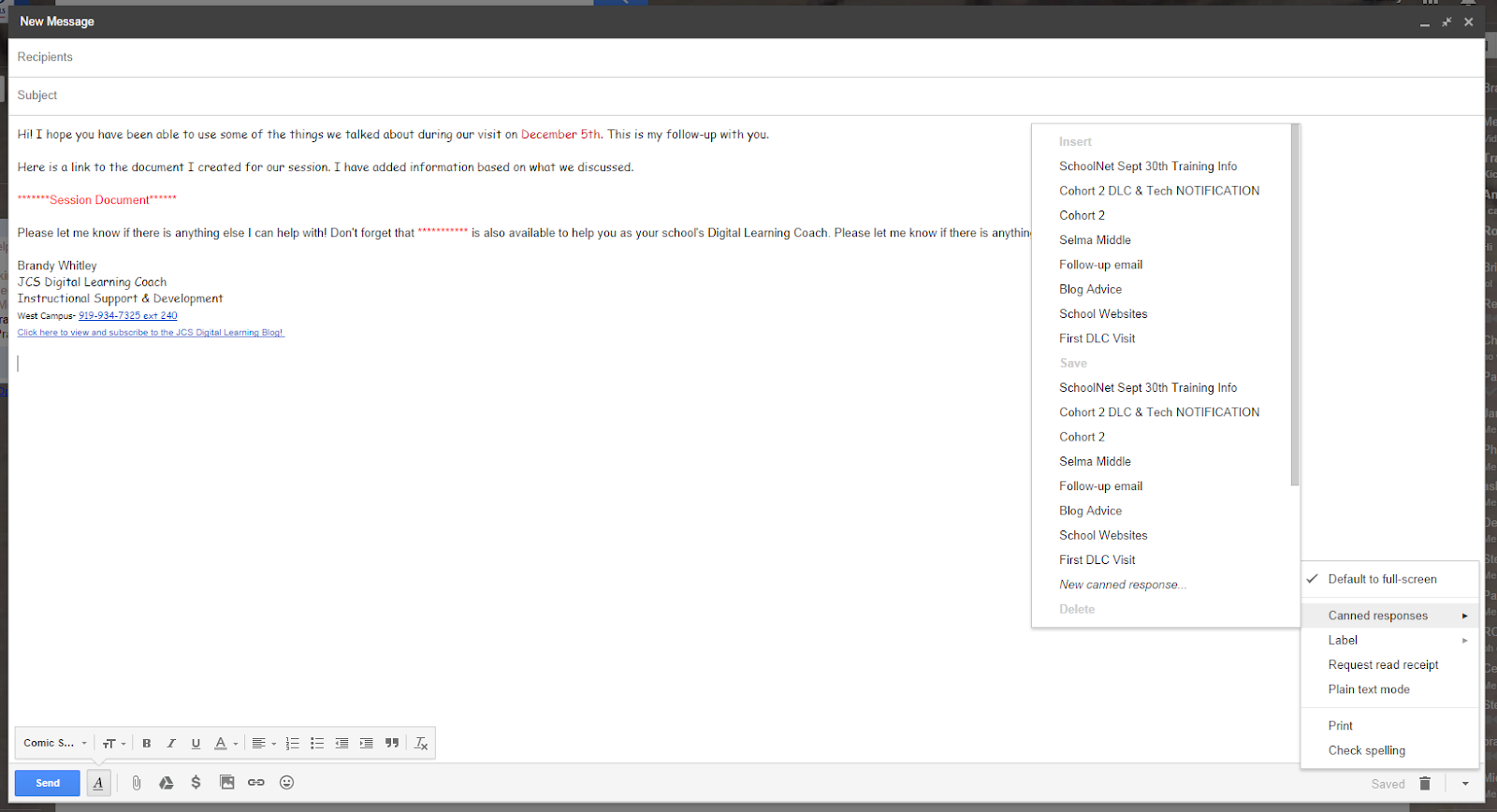
Next you will compose a new message. Once you have your message ready to go, click on the drop down arrow located at the bottom right corner of the new message. Click on Canned Responses, then click on New Canned Response.


Give it a name that will make it easy for you to identify.   


Now you are ready to send a canned response as needed. To insert the canned response, simply, compose a new email, click on the drop down arrow located at the bottom right corner of the new message. Click on Canned Responses, then click on name of the canned response under the Insert category. Personalize/modify it or fill in any specific information for that recipient, and your ready to send. It’s as simple as that.


Questions or Comments:
Email me at brandywhitley@johnston.k12.nc.us

Tuesday, June 10, 2014

End of Year Cleanup for Drive and Gmail-Google Takeout


The last week of school is here and it is a great time for students and staff to cleanup your email and drives before you leave for the summer.  Here are a few best practices and tools to help you.

Student/Staff Drives:
It is a good idea to backup all files on your school based drives before you leave for the summer. Refer to your EOY checkout sheets for your school process, many schools will delete all files on "shared" drives to start fresh for the upcoming year.

Google Takeout:
To create an archive of all files on up to 16 different Google products including Drive and Gmail. This process is free and very simple, just follow the onscreen directions as shown below.

1. Create an archive:


2. Select your services to backup and your file download type (by default all files will download as a zip file):


3. Click Create Archive

4. Download your archive file:

Your archive file might take a few minutes to prepare depending on the amount of files in your Drive and Gmail. Your archive file will be available for seven days. It is strongly encouraged you download your archive file to your home computer or a flash drive.  

Questions? Comments?
Please email me at pamelabatchelor@johnston.k12.nc.us


Friday, May 16, 2014

Friday Google Tidbits: New Look for Chat and Great Chrome Extension for Reading and Writing Support is now Free!

Happy Friday!


This week, we have two new Google tidbits to share. First, Google Chat in Gmail has been upgraded to a new look with circles for avatar pictures. The look resembles Google + and should happen for everyone over the next few weeks.

New Chat Look:

Secondly, a wonderful Chrome extension called Read&Write for Google is now available with all advanced features for FREE to teachers! Read&Write works with Google Docs to provide additional supports for students including highlighting, vocabulary help, read aloud features, translator, and access to talking and picture dictionaries.


To unlock the premium features of this Chrome extension:
  1. Install it from the Chrome Store by clicking HERE and clicking on the +Free button. 
  2. You must register at http://rw.texthelp.com/drive/home/RegisterTeacher with your school email to unlock the premium features.
I hope everyone has a wonderful weekend!

Questions? Comments?
Please email me at pamelabatchelor@johnston.k12.nc.us

Friday, May 9, 2014

Friday Google Tidbits: Quick Tutorial on Inserting Invitations in Gmail and New Image Tools for Google Docs

Happy Friday!


Today, we have two Google tidbits to share. First, I have created a quick tutorial screencast on how to insert calendar invitations into Gmail.  This tool is especially helpful for scheduling meetings when everyone is free. As long as everyone you invite to the meeting has shared their calendar with you, you can see when everyone is free and plan your meetings accordingly.


Secondly, the new image tools that were released a few weeks ago for Drawings and Slides are now available for Docs. You can edit images and crop them directly within your document. For more details, please click HERE.

Have a great weekend!

Questions or comments?
Please email me at: pamelabatchelor@johnston.k12.nc.us

Friday, April 25, 2014

Friday Google Tidbit: New Tool to Insert Images in Gmail

Happy Friday!

This week, Google has released a new tool for inserting images into an email. Previously, you clicked on the paper-clip icon to attach images, now there is a small picture icon you can click on to upload images.


When you click on this icon, you will have several locations to choose an image from.


You also have the option in the lower left corner to add the image directly in your message or as an attachment.

Once you have your image in the message, you can hover over it to change the size of the image or remove it.

Questions? Comments?
Please email me at: pamelabatchelor@johnston.k12.nc.us


Friday, February 7, 2014

Friday Google Tidbit: How to logout of your Google account remotely from anywhere!

Have you ever logged into Google on a computer or 
device and then left, forgetting to log out first 
but remembered when you went to log in somewhere else?

I have and if you have....
Here's a super easy way to log out remotely from any device!

  1. Log into your Gmail

   2. Scroll all the way to the bottom of the page and click on "Details"


    3. Click on "Sign out all other sessions"

That's it! No more wondering or second guessing...

You can also set up alerts from this page if you think someone may have your account information.

Questions or Comments?
Please email me at: pamelabatchelor@johnston.k12.nc.us


Friday, November 15, 2013

Friday Google Tidbit: New Gmail Option-Download to Google Drive Coming Soon!


Earlier this week, Google announced a new update to Gmail and how attached files in an email can be downloaded. With the new update, you will have the option of downloading attachments directly to your Google Drive. This will eliminate the process of having to download the file to your computer or flash drive and then uploading the file to Google Drive.  You will still have the option of saving the file to your computer or flash drive as well as Google Drive.

This update will be available within the next few weeks.

For more information, please see the official Google Blog post by clicking HERE