Hyperlinks in Google Sheets

Creating a hyperlink in Google Sheets used to mean editing a complicated formula. Not anymore! There are 3 easy ways to insert links into Google Spreadsheets.
To get started, open Google Spreadsheet and click on the desired cell and type the text to be hyperlinked. Choose one of the following methods.
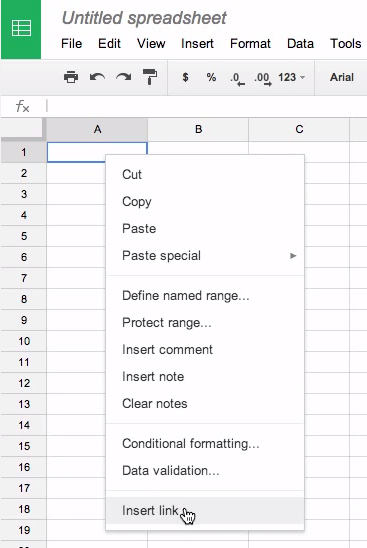
Method # 1-Right click the cell and select insert link. Type or copy and paste the web address into the link box. Click “Apply” and it’s done.
Method # 2- Click on the hyperlink icon in the menu. Type or copy and paste the web address into the link box. Click “Apply” and it’s done.
Method # 3- Use the keyboard shortcut: Ctrl k. Type or copy and paste the web address into the link box. Click “Apply” and it’s done.
Questions or comments?
Email me at brandywhitley@johnston.k12.nc.us
 Friday Google Tidbit: Hyperlinks in Google Sheets