Technology Thursday: Easy Resources for Inclement Weather or Substitutes Technology Thursday: Easy Resources for Inclement Weather or Substitutes

  Tis' the Season for Winter Weather! Here are some ideas for resources that could be quickly added to Google Classroom/Canvas or printe...

EOY Preparations & Logistics for collection, assessment, and inventory of Chromebooks, Hotspots, & Chargers EOY Preparations & Logistics for collection, assessment, and inventory of Chromebooks, Hotspots, & Chargers

  Schools should collect, assess, and inventory (and key in repairs) equipment for EOY.  For summer school, plan to distribute devices in c...

NCWiseOwl Gift NCWiseOwl Gift

  NCWiseOwl Holiday Gifts for NC Educators! NCWiseOwl offers many holiday gifts for North Carolina educators! eBooks and Publications topics...

Inventory in Destiny Inventory in Destiny

We have received several questions regarding our inventory.  For those that may still be allowed to work at your school/work site and ...

NCWISEOWL Webinar Schedule - please share NCWISEOWL Webinar Schedule - please share

WiseOwl Resources Have you been using NCWiseOwl?  Would you like to learn more about their resources?  So much here we need to make sure w...

Open House Forms Access for Chromebooks & Windows Open House Forms Access for Chromebooks & Windows

For chromebooks, we created three new kiosk apps t o open the following resources: https://www.jcsvolunteers.com/ https://www.lunch...

Inventory in Destiny Inventory in Destiny

You can start your EOY inventory at any time now.  Please be sure to have your inventories completed by May 31.  We have some chromebo...

Wednesday Web Tool: All About Our Laugh, Lunch, and Learn Visits! Wednesday Web Tool: All About Our Laugh, Lunch, and Learn Visits!

This week, we are sharing all about our Laugh, Lunch, and Learn visits. Since the fall, our team has visited ten JCS schools to share a...

Wednesday Web Tool: 3 Ways to Find Web Tools! Wednesday Web Tool: 3 Ways to Find Web Tools!

Have you ever wondered... Which web tool should I use? Does this work on ... device? Today we are sharing three ways to quickly fin...

Resources Drive Clean up Resources Drive Clean up

Resources Drive Changes! The recent changes to accounts has revealed a few things that need clean up. Only one tech contact will have...

Media Update: American Indian Books & BOB Media Update: American Indian Books & BOB

Our ESL department has ordered resources or Native American Indians. The resources will be delivered to the media center sometime in th...

Wednesday Web Tool: End of the Year Activities and Resources Wednesday Web Tool: End of the Year Activities and Resources

It is getting close to the end of the year and many times we end the year with a reflective activity or project. Here are a few good ...

Showing posts with label resources. Show all posts

Thursday, January 20, 2022

Technology Thursday: Easy Resources for Inclement Weather or Substitutes


Tis' the Season for Winter Weather!


Here are some ideas for resources that could be quickly added to Google Classroom/Canvas or printed for easy use in the Classroom.

  • Printable Worksheets from Study Island (5th & 8th Grade Science, HS Biology): In Study Island, click on NC Programs, select your grade level and subject area, and then click on a topic link to view printable worksheets that can be customized.
  • Videos and Resources from Discovery Education (all areas, K-12): Click on the Discovery Education icon in ClassLink and browse standards. Use the filters to find videos with related materials or quizzes under the filters for details. Resources from Discovery Education can be downloaded to a student's device for viewing from home without an internet connection.
  • Studies Weekly (K-5 Social Studies): Click on the Studies Weekly icon in ClassLink, select your grade level, and click on the page icon under student edition to download the student edition to use with your students and add a few questions for discussion.
  • enVision Mathematics (K-12) and MyPerspectives (6-12): Open Savvas Realize, click on Resources > Teacher Resources, and select the "Recommended for Distance Learning" to find printable quick checks and other activities.
  • Into Reading (K-5): Open the Ed icon in ClassLink, click on the Discover tab, and select a unit. Many resources and activities are available as PDF files to print or share digitally.
  • NCWiseOwl - find resources by grade band, including ebooks for students in grades K-12.
Do you have a favorite resource? If so, share it in the comments?

Wednesday, March 24, 2021

EOY Preparations & Logistics for collection, assessment, and inventory of Chromebooks, Hotspots, & Chargers


Schools should collect, assess, and inventory (and key in repairs) equipment for EOY.  For summer school, plan to distribute devices in classrooms as sets, check out to individual students, or manage as determined best for your school. 

-Plan logistics for collection of devices 

 - You will need a team of staff members to participate in device collection, assess, and scan devices     back in inventory. 

 - Consider logistics, examples may include stagger collections and assessment by grades or classes,

    all at once, personnel available to help, etc. The device may need to be assessed for damages with     the student/parent present. 

-Collect and assess devices and charging adapters.  Tech Services will be working throughout the

    summer repairing devices in preparation for Fall start-up.  

-Key in Schooldude/IT direct tickets (or submit on the provided form from Tech Services) for

    damaged devices in need of repairs.  

-Process collection letters for damages/losses.  

-Inventory Chromebooks, Hotspots, and other technologies by the last teacher work day,

    Thursday June 3, 2021. 


Note: Accurate inventories are critical for technology refresh purchases as each school's data is     used to guide technology refresh allocations.  

-Not sure how to begin your inventory? Here are the instructions on how to get started!

Monday, January 4, 2021

NCWiseOwl Gift


NCWiseOwl Holiday Gifts for NC Educators!

ncwise gifts

NCWiseOwl offers many holiday gifts for North Carolina educators!
eBooks and Publications topics:

  • Learning Strategies
  • Learning Disabilities
  • Digital Literacy
  • Distance Learning
  • Reading Literacy
  • Social Emotional

Also, find education journals aligned to subjects and discipline areas!  Visit the NCwiseOwl Toolkit professional learning page for the complete list with links.
          

Friday, March 20, 2020

Inventory in Destiny


We have received several questions regarding our inventory.  For those that may still be allowed to work at your school/work site and are looking for something to do, now would be a great opportunity to work on your inventory.  Also, you can clean up items in Destiny such as patrons, home locations, lost items, etc. That is, as your principal/supervisor approves.

During this time, in lieu of phone calls, it is best to reach Tech Services via email.  Feel free to contact us as needed.  Thank you for all you do!

Monday, November 4, 2019

NCWISEOWL Webinar Schedule - please share

WiseOwl Resources

Have you been using NCWiseOwl?  Would you like to learn more about their resources?  So much here we need to make sure we use it in order for the state to continue to provide these resources.  If you have a desire to know more please consider attending one of the upcoming webinars available from Gale addressing NCWiseOwl resources aligned to various topics including ESL, Special Education, IBL/PBL, STEM and CTE.  Offerings include later afternoon and evening hours.  This information is also available in the NCWO Toolkit on the Professional Learning Page. Here is a Flyer you can print out with all the dates and topics.


Tuesday, August 21, 2018

Open House Forms Access for Chromebooks & Windows

For chromebooks, we created three new kiosk apps to open the following resources:


For windows, we created a generic login to access the resources: 

login name: openhouse
login password: openhouse


Please note: Access will be disabled after all Open Houses have been completed.

Thursday, April 19, 2018

Inventory in Destiny


You can start your EOY inventory at any time now.  Please be sure to have your inventories completed by May 31.  We have some chromebooks and PCs sprinkled across the county that have been entered into Destiny under the incorrect model.  If you find items that need to be corrected, let us know and we can help you move the items to the correct model.  Having a model incorrect in  Destiny could mean the difference between having priority discards and devices that still have some life left in them.  In addition to checking model numbers during your inventory, the intended use field should also be verified.

It is our recommendation that your school's inventory be completed/finalized before you begin your DLMI report.  Click here for inventory notes.

Remember, these numbers drive your school's tech profiles as well as the state using this information for your school's report card.


Wednesday, March 9, 2016

Wednesday Web Tool: All About Our Laugh, Lunch, and Learn Visits!


This week, we are sharing all about our Laugh, Lunch, and Learn visits. Since the fall, our team has visited ten JCS schools to share a unique learning experience during lunch. We have different stations for students and staff to explore during lunch such as Virtual Reality, Augmented Reality, Green Screen, Digital Music Creation, Robotics and Coding, and Stop Motion Video Creation. We hope to add additional topics to our experience in the future.

The video below is a snapshot of our experience so far!

One of the questions we frequently get asked is how can I use this in my classroom? We have created a guide of our resources (feel free to share the link!) and we are happy to help any teacher get started. Please reach out to us, we want to help you ignite a passion for learning in your classroom!


Wednesday, March 2, 2016

Wednesday Web Tool: 3 Ways to Find Web Tools!

Have you ever wondered...

Which web tool should I use?

Does this work on ... device?


Today we are sharing three ways to quickly find appropriate web tools for your students. Whether you are searching for device specific resources or for a web tool that focuses on a certain skill or product; here are three great places to find the right tool.

App Recommendations for Mobile Devices by edtechteacher


Allows you to search educational apps by either device or learning activity. It gives a short overview of every app and a rating for ease of use by student and teacher. This resource does list free and paid apps.


Free Comparison Charts of Ed Tech Tools by Richard Byrne


Richard Byrne is the creator of the blog Free Technology for Teachers and he is sharing a great set of comparison charts of popular ed tech tools that include links to tutorials. Mr. Byrne is also presenting this week at NCTIES, be sure to catch one of his sessions if you are attending!


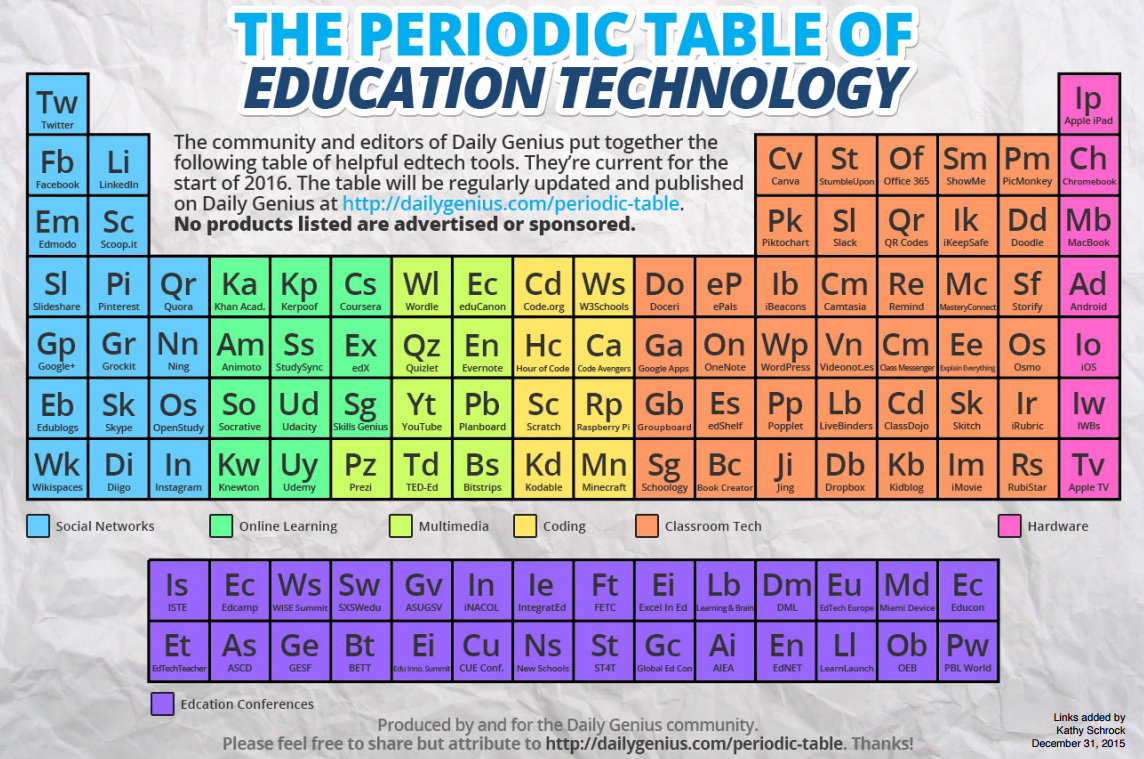
Periodic Table of Education Technology


The Daily Genius community created this table of ed tech tools and Kathy Schrock added the links to the PDF document. A great visual tool for finding resources.

Friday, February 26, 2016

Resources Drive Clean up


Resources Drive Changes!
The recent changes to accounts has revealed a few things that need clean up. Only one tech contact will have rights at each school.  The tech contact should look closely at the Resources drive for your school and clean up the files in it - the Resources drive is viewable by both students and staff.  There are some secure documents that have ended up in some of the local resources drives and they can only be deleted by the tech contact.  Please make an effort to review what is in your drive and clear out files that shouldn't be seen by both students and staff.

Monday, August 24, 2015

Media Update: American Indian Books & BOB


Our ESL department has ordered resources or Native American Indians. The resources will be delivered to the media center sometime in the next couple of weeks there will be 20 or so books that will need processing. Once you receive these resources please share the information with your staff and students so they can take advantage of these materials.  If you have questions you can contact lynandrews@johnston.k12.nc.us

Also a reminder to Battle of the Books coaches if you want to participate in the regional or state competitions should your team win one of your coaches must be a member of the North Carolina School Library Media Association. Membership is $40 and here is the link for you to register as a member http://www.ncslma.org/membership.  

Wednesday, May 21, 2014

Wednesday Web Tool: End of the Year Activities and Resources


It is getting close to the end of the year and many times we end the year with a reflective activity or project. Here are a few good ideas that might inspire you and give you some resources to make your hectic schedule a little less stressed.

Project Idea-Letters:

Having students write letters to an upcoming class of students is a great way to have them reflect on everything they have learned and what advice they give upcoming students can be very eye-opening for you as their teacher.

Resources:
  • Go digital! Have students write letters using Google Docs and they can share the letters with you or classmates for easy peer editing.
  • For the younger crowd, http://www.zooburst.com/ is a free website that allows you to make 3-D pop-up storybooks.
  • An alternative to a letter is to allow your students to create their own cartoons and comic strips. http://www.powtoon.com/ is a great free resource that will have your students laughing while creating an awesome final project.

Project Idea-Life Skills:

The end of the year can provide some extra flexibility in your curriculum to teach students some extra skills that will help them be productive citizens. Topics such as financial responsibility, cultural experiences, or virtual field trips are all great ideas. One of my favorite end of year projects is to have the students plan a family trip to a location we studied during the year. Figuring out travel costs, passport regulations, and activities opened my students minds to the world around them and gave them a new appreciation for family trips. It was very easy to include multiple subject areas with activities such as a chart for fuel costs based on destinations or meal prices.

Resources:

Project Idea-Multimedia Project:

Anything from interactive flip-books, to videos, to presentations can be made with a variety of interactive Web 2.0 Tools. 

Resources:
  • http://animoto.com/ is so simple to create awesome looking videos. If you decide to use Animoto, make sure you register for the free Educator account to unlock unlimited time for videos and a bunch of free video styles.
  • http://www.dipity.com/ is a super cool way to create timelines that include pictures and videos. 
  • http://storybird.com/ allows students to create very cute online storybooks.
  • https://present.me allows students to upload a power-point presentation and add annotations and voice narration.